Ten years of climate
Temperature, sea, sun and rain days for every month, measured, not guessed. You see how your trip will feel before you go.


Published 9 October 2026 · HolidayWow editors · Written with AI, numbers checked against our data ·
A spreadsheet holds whatever you type into it; this planner builds the trip from one sentence, keeps every day in order as you edit, and updates the weather and the prices on its own, without a column needing to be retyped.
A spreadsheet or shared document is the classic do-it-yourself itinerary: flexible, typed by hand, and familiar enough that most travellers reach for one without thinking twice. A column for each day, a row for each stop, a note for the booking reference, it holds whatever you type into it and nothing more.

This planner starts from the same blank page but a different first step: describe the trip in one sentence or by voice, and the days, the stops and the pace appear already drawn on a map rather than needing to be typed in row by row.
A spreadsheet is quick to start and completely flexible: any column, any note, any order, and it travels well as a shared document that anyone can open from a link. It suits a traveller who wants full control over the layout and does not mind typing in each detail by hand.

Three travel paces, relaxed (one to two stops a day), balanced (two to three) and packed (three to five), set for the trip or a single day, shape the plan from the first draft, and the plan checker re-orders a day automatically whenever a stop moves, rather than needing every row below it checked by hand. Dates are optional while the trip is still loose, and adding real dates later brings in the weekday, live weather and live prices without a single cell needing to be edited.
Updating a weather column or checking a live price by hand is work a spreadsheet leaves entirely to you; this planner keeps both current on the same day card as the route.
New trip


When, who with, what matters and what's a no. No form, no ten filters. HolidayWow understands the dates, budget, departure point, pace and wishes from one sentence.

New trip
Every idea comes with a total price and a clear answer to why it fits you: weather, flight time, beaches, food, short distances.

Your trip ideas
Sicily
Food · small towns · sea
7 days for 2

Crete
Sea · tavernas · nature
7 days for 2

Mallorca
Sea · comfort · short distances
7 days for 2
Arrival, transfer, check-in, sunset, dinner. Just say “make it cheaper” or “no car hire” and the trip adapts.

Day 1
Arrival
Arrival in Heraklion Transfer · 35 minCheck-in by the sea
 Sunset
 Taverna at the harbour
Rain on the way? Then the beach day becomes a day at the market and a museum. Flight status, weather and your day plan in one place.

Day 3 · boat trip
A week in Lanzarote in June comes back against day 22 °C, night 20 °C, a sea at 21 °C, 10 hours of sunshine and no rain days, with the door-to-door leg already drawn in, numbers that would otherwise need looking up separately and typing into their own column.
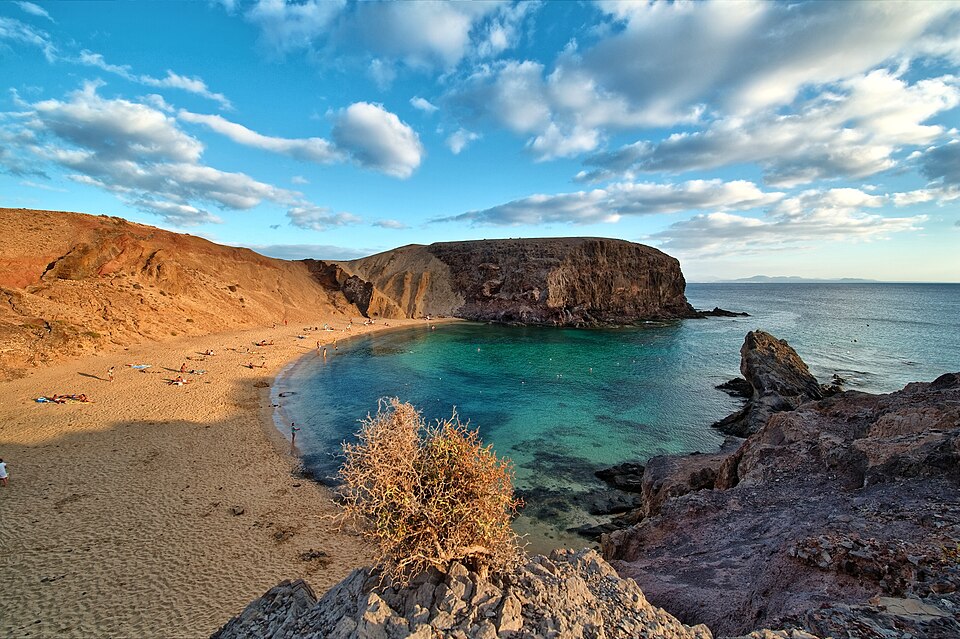 LanzaroteiPhoto: Lviatour · CC BY-SA 3.0 · Wikimedia Commons
A UK long weekend in November, with day 12 °C, night 10 °C, a sea at 13 °C and 21 rain days, gets the same treatment: a plan drawn on the map rather than a short list of rows waiting to be filled in and updated by hand each time something changes.
LanzaroteiPhoto: Lviatour · CC BY-SA 3.0 · Wikimedia Commons
A trip already roughed out in rows and columns, say a few days in Berlin in February (day 5 °C, night minus 2 °C, 10 rain days) or Prague in December (day 3 °C, night minus 2 °C, 11 rain days), can simply be described again here in one sentence, and the planner draws the route, sets the pace and attaches the climate numbers automatically.
 Prague
 BerliniPhoto: Ansgar Koreng · CC BY 3.0 de · Wikimedia CommonsPragueBerliniPhoto: Ansgar Koreng · CC BY 3.0 de · Wikimedia Commons
Stays, tours and transport show a real price from a partner (Booking.com, GetYourGuide, Viator, Trip.com, flight partners), or a button to check the live price, kept current without anyone needing to go back and update a figure typed in weeks earlier. Booking happens inside the plan through partner links in pounds, with a trip budget, price watch and cost splitting for a group, so a cell that once needed a manual total now keeps itself current.


Temperature, sea, sun and rain days for every month, measured, not guessed. You see how your trip will feel before you go.
Direct flights, flight times and transfers from 9 UK airports, worked out from your door to the hotel.

Flights, hotel, transfers and experiences in one sum for everyone traveling, with the provider and when the price was checked. No teaser prices.

One link opens the same plan for everyone travelling, with roles for who can view and who can edit, keeping two people from accidentally overwriting each other's changes the way a shared spreadsheet sometimes allows. Group members can vote on a stop or comment on a day, and the plan film turns the finished trip into a short film on the map once it is booked.

A spreadsheet itinerary often grows a second tab for packing and a third for booking references, each one needing its own upkeep. Here, a packing list builds itself from the plan, the month and the climate at the destination, and a document vault keeps passports, tickets and confirmations with the trip they belong to, so nothing needs its own separate tab.

For a trip with several stops in different climates, a city then a coast, a packing list built from the actual plan catches a layer or a pair of shoes a hand-typed list might miss, since it is working from the real climate numbers for each stop rather than memory, numbers the spreadsheet never had in the first place unless they were looked up and typed in separately.

Describe the trip you would otherwise have built in a spreadsheet, one sentence is enough, and watch the plan appear on a map, ready to edit, price and share from there, updating itself as the trip gets closer, with no column left to retype as the dates and prices settle.
Yes. Describe the trip in one sentence and the plan is drawn on a map with real climate numbers and real prices attached, both kept current without retyping a cell.
A spreadsheet suits a traveller who wants full control over the layout and does not mind typing in each detail. This planner suits a trip that should update its own weather and prices.
The app is free to download and to plan with. Real prices for stays, tours and transport are shown by partners inside the plan when you are ready to book.
Yes. Roles decide who can view and who can edit, and the plan updates for everyone holding the link, avoiding the overwriting that can happen in a shared spreadsheet.
Yes. Describe the trip again in one sentence, naming the places and the month, and the planner draws the route, sets the pace, and attaches the climate numbers automatically.
Yes. A packing list builds itself from the plan, the month and the climate at each stop, and a document vault keeps passports, tickets and confirmations together, so neither needs its own separate tab.
Yes. The plan checker re-orders a day automatically whenever a stop moves, catching a clash the moment it happens rather than leaving it to be spotted on a later read-through of the rows.
Yes. A short domestic break and a longer trip abroad both start from the same one sentence, with the route, the pace and the climate numbers drawn the same way for either.
Your next trip

Describe your trip in one sentence. When, who with and what matters to you.

Where it's warm right now, real fare finds from your airport, bank holiday breaks for your nation and a ready-made trip to make your own.